

Track Order
Track Your Order
Once your order is shipped, you will receive your tracking ID through WhatsApp/SMS.
Click the button below and enter your tracking ID to track your shipment.

How to Track Your Order (Step by Step)
Step 1 — Open India Post Tracking
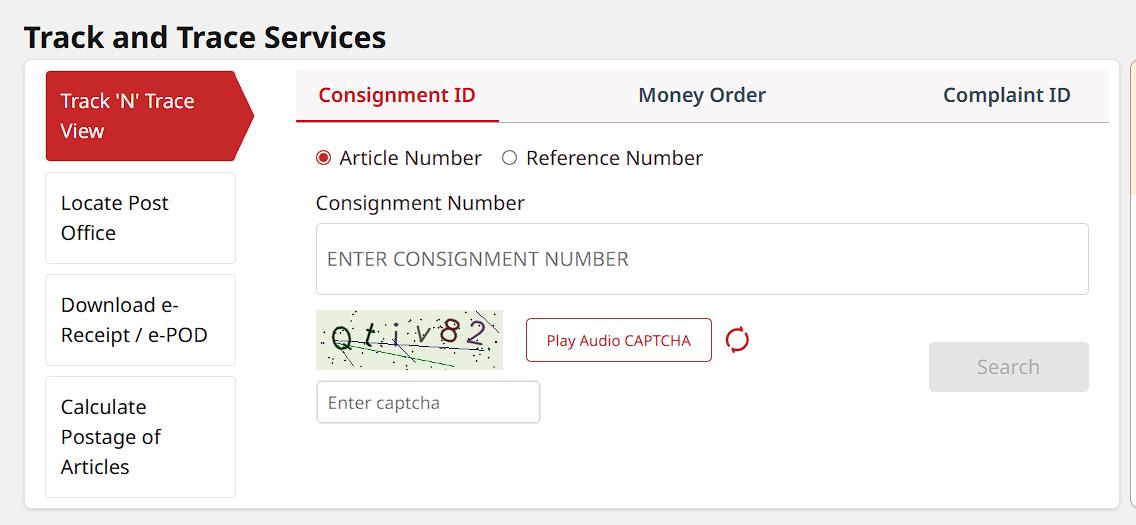
Click the “Track Your Order” button above to open the official India Post tracking page.
Step 2 — Enter Your Tracking ID
After your order is shipped, you will receive a Tracking ID / Consignment Number from us.
Example:
EK123456789IN
Paste your tracking number inside the:
“Consignment Number”
Step 3 — Enter Captcha
Type the captcha shown in the image into the captcha box below it.
Step 4 — Click Search
Click the:
“Search”
button to view your shipment status and delivery updates.
Important Note
Tracking details will only be available after your order has been shipped.
Need Help?
If you face any issues while tracking your order, feel free to contact us.
📞 +91 94430 82830
📧 care@banyainc.in